Your septic panel deletes its own memory every few weeks. Pulse keeps it.
Drop in the download from an SJE Rhombus EZ Series panel and get a clean read on pump health, flow vs. design, and inflow & infiltration — on any phone or laptop, no install. Panel intelligence for septic systems.
.EZI downloads. QRchive Pulse is an independent companion tool and is not affiliated with or endorsed by SJE Rhombus.The panel logs everything. Then it forgets.
Every EZ Series panel records pump cycles, run-time, and tank level — then overwrites the oldest data once its buffer fills (about three weeks on a busy system). The manufacturer's reporting software runs on Windows only and shows a raw event grid. Pulse turns the same download into answers, and merges every download into a permanent history the panel itself can't hold.
The stock reporting software
- Windows-only legacy app
- Raw event grid — you interpret it yourself
- No trend analysis, no alarms, no flow-vs-design
- History dies with the panel's rolling buffer
- No client-ready report
QRchive Pulse
- Any browser — phone, tablet, Mac, PC — offline
- Pump health, flow, diurnal pattern, plain-language diagnostics
- Flow vs. design ADF/DDF; inflow & infiltration analysis with rainfall
- Merges every download into one permanent history
- One-click client-ready PDF report
Read the system, not the raw log.
Flow vs. design
Measured daily and peak flow against the system's design ADF/DDF — real occupancy load against the basis of design, not a guess.
Inflow & infiltration
Overlay Environment Canada rainfall and test wet-weather flow against a day-of-week baseline — catch stormwater or groundwater leaking in, the costliest failure mode.
Pump wear & duty
Seconds-per-dose trend, duty balance between pumps, short-cycling — turn reactive callouts into scheduled maintenance.
Permanent history
Each download merges and de-dupes into one continuous record — the long-term history the panel's rolling buffer erases.
Coverage & gaps
See exactly which days are missing and get a "download again by" date so history never silently disappears.
Client-ready report
One-click PDF — KPIs, charts, diagnostics, coverage — to hand a client or attach to a file.
The dashboard, on real panel data.
Every panel below is a live screenshot of the actual tool reading a real two-month merged history — not a mock-up. Click any of them to open the same data yourself.

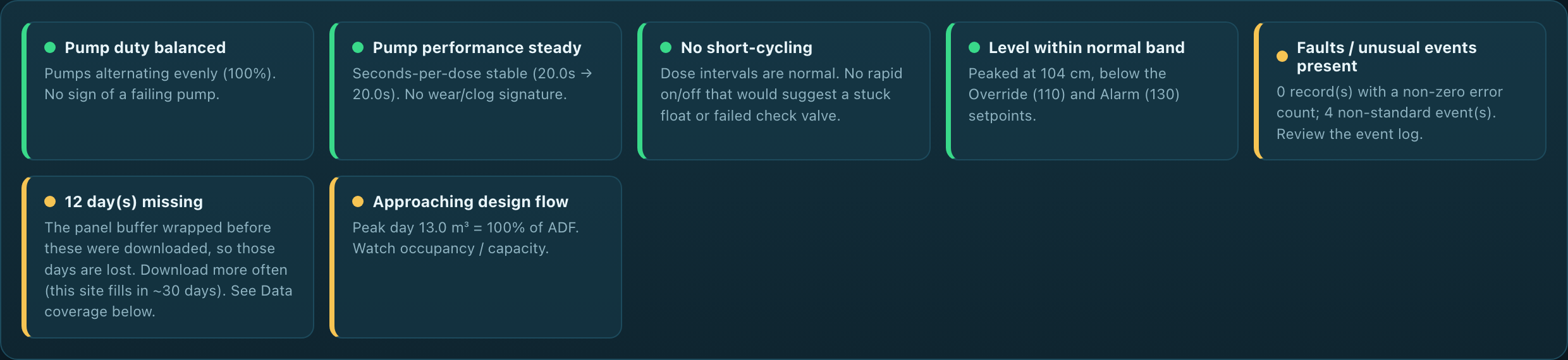
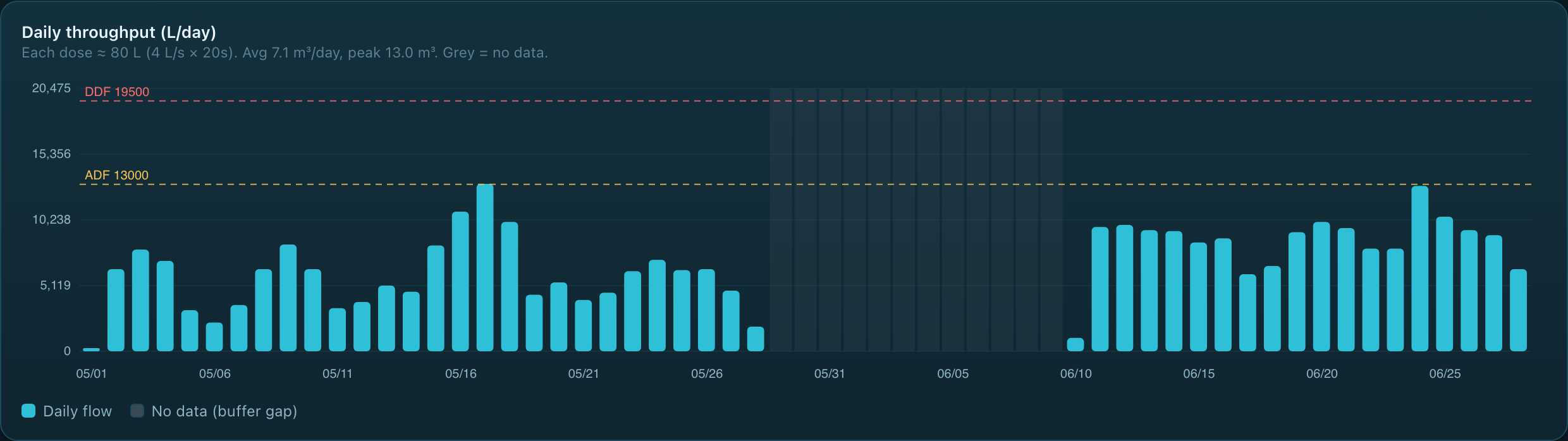
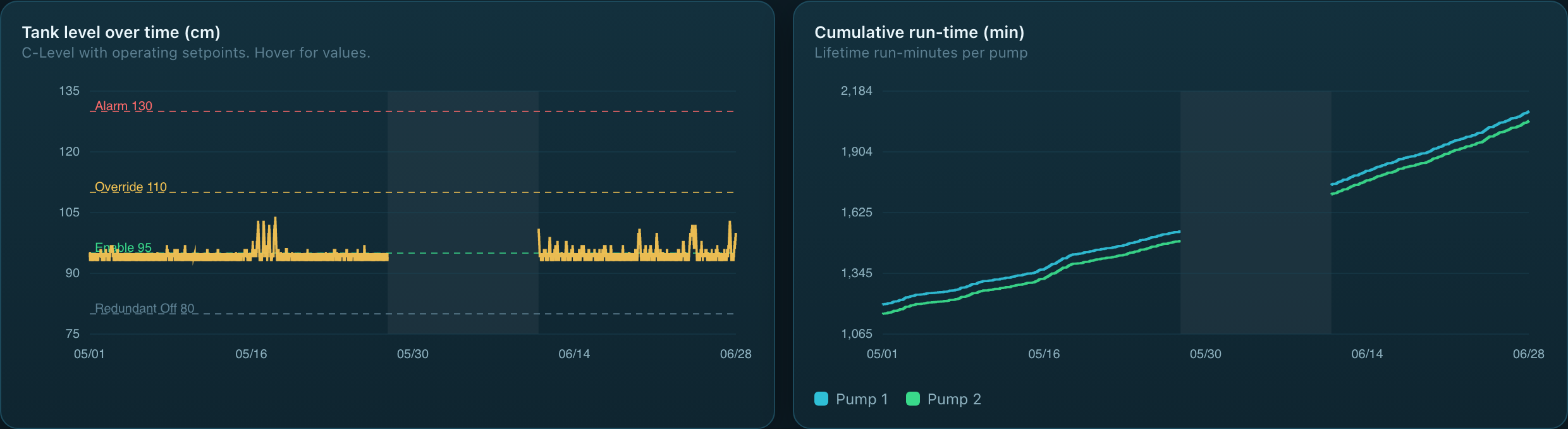
A Vancouver Island campground, one month of data.
Built by a practising BC septic system designer on one of their own client systems (May 2026). Every figure below is real, computed from the panel's own 4,080-event download.
Start free. Upgrade only for what a file on your laptop can't do.
The free tool is genuinely the whole analysis engine. The subscription adds what a single offline file structurally can't: your history kept safe in the cloud, on every device, with alerts and your own branding.
Free
- The full analysis engine
- Diagnostics, flow, I&I, coverage
- Merged history (in your browser)
- Client-ready PDF report
- Runs offline, any browser
Pulse
- Everything in Free, plus:
- Cloud history, synced to every device
- Unlimited panels & unlimited users
- Alerts: failing pump, I&I, overdue download
- Your logo on client reports
- Files reports to the panel's QRchive archive
Stack
- Pulse + QRchive Pro
- Ask any archive questions with AI
- Scan a panel → docs and performance
- Auto-file reports to the sticker
- API access
Need an engineer-reviewed commissioning or design-validation report — sealed, measured-vs-design, the kind you attach to a submission? That's an engineering service from Pacific Rim Wastewater Solutions, the firm that built Pulse. Ask about a commissioning memo →
Email the log from the panel. It's in Pulse before you're back in the truck.
Every Pulse subscription is getting its own email-in address: send the panel download to it from your phone at the site, and it's decoded, checked, filed to the right system, and merged into the history automatically. No laptop, no drag-and-drop. Reserving a founding spot is what unlocks the build.
Send me the free Pulse tool
Drop your email and the link appears right here. It's a single file — save it, bookmark it, use it on any device. No account, no card.